Best Android Auto Apps 2026: 10 Apps You Should Try
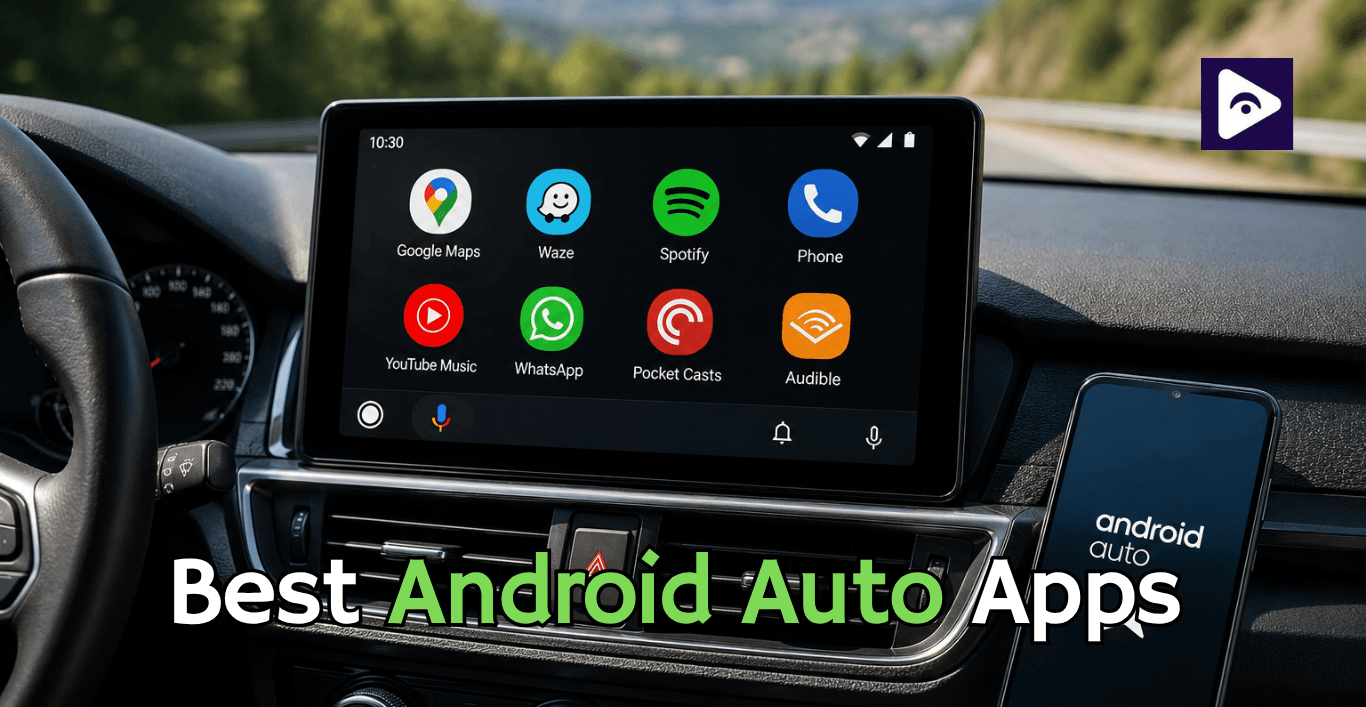
If you use Android Auto all the time, Android Auto can be a lot of fun with the best apps. You can easily control things like navigation and music and messaging and podcasts from your car's screen. Some Android apps do not work with Android Auto and some Android apps are way more useful in your car than they are on your Android phone.
This guide is about the Android Auto apps for 2026. It talks about navigation apps like Google Maps and Waze and HERE WeGo. It also talks about music and messaging and entertainment options, for Android Auto.
We’ve also included How to use Fermata Auto, which is worth looking at if the standard Android Auto app selection feels too limited.
The Best Android Auto Apps in 2026
| App | Best For | Main Advantage |
|---|---|---|
| Google Maps | Everyday navigation | Traffic and route guidance |
| Waze | Live traffic | Community road reports |
| HERE WeGo | Offline navigation | Downloadable maps |
| Sygic | Advanced GPS | Additional navigation features |
| Spotify | Music | Playlists and streaming |
| YouTube Music | Music | Large music library |
| Messaging | Voice based messaging | |
| Audible | Audiobooks | Long distance listening |
| Pocket Casts | Podcasts | Podcast playback and controls |
Best GPS Apps for Android Auto
Navigation is the reason most drivers connect their phones to their dashboard. Having GPS navigation Android Auto software helps you spend less time stuck in heavy traffic and more time having a good drive.
1. Google Maps - Best Overall Navigation
Google Maps Android Auto is the easiest starting point for most drivers.
If you already use Google Maps on your phone, there is almost no learning curve. Your saved places, previous destinations and familiar map interface make it simple to search for somewhere and start driving.
Google Maps also works well with voice commands. You can ask for directions, an estimated arrival time or information about your route without typing on the car display.
Why Google Maps is one of the best Android Auto apps
- Live traffic information.
- Turn by turn navigation.
- Lane guidance.
- Voice commands.
- Estimated arrival times.
- Business and location search.
- Saved locations.
Best for: Everyday driving, commuting and general purpose navigation.
2. Waze - Best for Live Traffic and Road Alerts
If traffic is your biggest concern, Waze Android Auto is worth having.
Waze focuses heavily on information reported by its user community. That makes it really helpful, during commutes when traffic can shift fast.
Google shows Waze as one of the navigation choices that can be used with Android Auto.
Why Waze stands out
- Real time traffic information.
- Road incident reports.
- Route changes.
- Voice navigation.
- Useful commuter focused features.
- Android Auto integration.
Best for: Drivers who regularly deal with heavy traffic and changing road conditions.
3. HERE WeGo - Best Offline Navigation App
A navigation app becomes much more valuable when your internet connection disappears.
HERE WeGo Android Auto is a strong option for drivers who want downloadable maps and an alternative to Google Maps and Waze. HERE officially lists Android Auto and CarPlay connectivity as part of HERE WeGo.
The offline capability is particularly useful for road trips, rural areas and international travel.
Why HERE WeGo is worth installing
- Offline map support.
- Route planning.
- Turn by turn navigation.
- Alternative to Google Maps.
- Useful when mobile data is unreliable.
Best for: Offline navigation Android Auto and longer trips where connectivity may be inconsistent.
4. Alternative Navigation Apps for Android Auto: Sygic & TomTom GO
For drivers wanting specialized lane guidance, truck specific routing, or 3D offline maps, Sygic and TomTom GO serve as excellent alternative navigation apps for Android Auto. Both apps offer head up display options and precise speed limit enforcement alerts that keep points off your driver's license.
Best Music Apps for Android Auto
When you get the navigation part figured out music is usually what people want to see on the car screen.
A good music app should be simple to use, with buttons that are easy to click and it should work well with voice commands so you do not have to look at your phone while you are driving.
5. Spotify - Best Overall Music App
Spotify is really easy to use with Android Auto.
You can get to your playlists. The music you have saved on Spotify from the car.
You can also see the albums and artists you like and the music you played recently.
Android Auto works with lots of music apps so you can play your music. Control it from the car screen or, by talking to it.
You can use your voice to tell Android Auto what to do with your music.
Why Spotify works well in a car
- Large music library
- Playlists
- Podcasts
- Voice controls
- Recently played content
- Simple interface
Best for: Drivers who already use Spotify for daily music.
6. YouTube Music - Best for YouTube Users
YouTube Music lets you get to your music library and playlists and recommendations and all that through Android Auto.
Google says YouTube Music is one of the services you can control with your voice when you are using Android Auto, which's pretty handy, for YouTube Music users.
Best for:
- YouTube Music users.
- YouTube Premium subscribers.
- Large music libraries.
- Personalized playlists.
7. Pocket Casts - Best Podcast App
For people who spend a lot of time listening to podcasts Pocket Casts is a tool to have.
Podcasts are really handy, in Android Auto because you can hear them while Google Maps or Waze keeps working to guide you.
Best for:
- Daily commuters.
- Podcast listeners.
- Long road trips.
- Downloaded episodes.
Downloading episodes before a long journey can also reduce your dependence on mobile data.
8. Audible - Best for Audiobooks
Audiobooks can make long drives less boring.
Audible is a choice if you like books instead of music and need something you can hear while the navigation works in the background.
Best for:
People who drive distances and people who listen to audiobooks often.
Best Messaging Apps for Android Auto
Messaging is a part of Android Auto.
These apps can tell you when you have a message and you can talk to them using your voice with Android Auto.
9. WhatsApp - Best for Everyday Messaging
If WhatsApp is your main messaging app, it is one of the most useful apps to have available with Android Auto.
You can use voice interaction to handle supported messages without typing on your phone.
Google's Android Auto documentation includes WhatsApp among supported messaging services.
Why WhatsApp is useful
- Message notifications.
- Voice replies.
- Hands free interaction.
- Familiar contacts.
- Android Auto support.
Best for: Drivers who use WhatsApp for most personal and work conversations.
10. Google Messages - Best for SMS and RCS
If you mainly use standard text messages, Google Messages is another useful Android Auto option.
It integrates naturally with Android and allows supported messages to be handled through voice interaction.
Best for: Drivers who use SMS or RCS as their main messaging method.
How Fermata Auto Works With These Android Auto Apps
This is where Fermata Auto fits into the picture.
Fermata Auto should not be thought of as another alternative to Google Maps, Waze, Spotify, or WhatsApp.
It serves a different purpose. It can enable Video streaming in your car screen like YouTube on Android Auto , Netflix on Android Auto and etc. And also features including local media playback, playlists, subtitles, IPTV, and other media capabilities.
The standard Android Auto apps above are designed for things such as:
- Navigation
- Music
- Podcasts
- Messaging
- Other driver focused functions
Why Use Fermata Auto With Android Auto?
There are situations where the normal Android Auto app selection may not provide the media experience you want.
For example, imagine you are:
- Waiting while your EV charges.
- Taking a break during a road trip.
- Waiting for someone in your parked car.
- Sitting at a rest stop.
- Using your car as a temporary entertainment setup.
Navigation and music are not necessarily enough in those situations.
Fermata Auto can provide additional media functionality, including supported local media and video features while parked.
Local media
If you have supported audio or video files stored on your Android phone, Fermata Auto can provide a way to organize and play that media.
IPTV
Fermata Auto can also work with supported IPTV playlists, making it useful for users who already have legitimate M3U based media sources.
Subtitles and media controls
For supported local video content, features such as subtitles and playback controls can make the experience more practical on a larger car display.
How to Install Fermata Auto

Common Android Auto Issues & Fixes
- An app is installed but does not appear
First check whether it actually supports Android Auto.
Installing an Android app does not automatically make it available on your car display.
Also check:
- Android Auto is updated.
- The app is updated.
- Your phone is connected correctly.
- The app supports your Android Auto version.
- The service is available in your region.
Google recommends using compatible apps from Google Play and provides guidance on managing Android Auto applications.
- Navigation keeps losing the route
Try downloading offline maps if your chosen navigation service supports them.
For longer journeys, it is also smart to keep a second navigation app installed.
- Music keeps stopping
Check your phone's battery optimization settings.
Android may restrict background activity for some apps, which can interfere with continuous playback.
- Android Auto disconnects
Try:
- A different USB cable.
- Cleaning the phone's USB port.
- Updating Android Auto.
- Restarting the phone.
- Restarting the car's infotainment system.
- Repairing wireless Android Auto.
A reliable connection is just as important as having the right apps.
The Best Android Auto Setup for Different Drivers
There is no single perfect combination.
For daily commuters
Google Maps + Spotify + WhatsApp
This covers navigation, music, and communication.
For drivers who deal with heavy traffic
Waze + Spotify + WhatsApp
Waze becomes the main navigation app while Spotify handles audio.
For road trips
Google Maps + HERE WeGo + Spotify + Audible
Use Google Maps for everyday routing and HERE WeGo as your offline backup.
For EV drivers
Google Maps + charging app + Spotify + Fermata Auto
Use the normal Android Auto apps while driving, then use Fermata Auto's supported media features when parked and charging.
For users who want more entertainment
Google Maps + Spotify + WhatsApp + Fermata Auto
The standard apps handle normal driving tasks, while Fermata Auto adds another media option for parked situations.
Frequently Asked Questions on Best Android Auto Apps
- What are the best Android Auto apps in 2026?
Google Maps, Waze WeGo, Spotify, YouTube Music and WhatsApp are choices.
- Which GPS app is best for Android Auto?
Google Maps is an all purpose option while Waze is useful for traffic updates.
- What is the best offline navigation app for Android Auto?
HERE WeGo is a choice because you can download maps for use.
- Can I use Waze with Android Auto?
Yes. Waze works with Android Auto. Provides navigation through your car display.
- Does Google Maps support Android Auto?
Yes. Google Maps provides navigation and traffic guidance through Android Auto.
- Can I use HERE WeGo with Android Auto?
Yes. HERE WeGo supports Android Auto and offers offline map functionality.
- Which music apps work well with Android Auto?
Spotify and YouTube Music are two options for listening to music while driving.
- Can Fermata Auto be used with these apps?
Yes. Fermata Auto can be used alongside your regular Android Auto apps for additional media features.
- Can Fermata Auto play videos?
Yes. It supports video playback features, but videos should only be used when the vehicle is parked.
- Is Fermata Auto a regular Android Auto app?
No. Fermata Auto is a third party media player that adds extra media functionality to an Android Auto setup.
![How to Add WhatsApp on Android Auto? [2026 Guide]](/content/images/size/w600/2026/08/whatsapp.png)